
It was a busy weekend at an IT convention in Austin, Texas. I had decided to make extra money using a ride-sharing app, and the passengers I met were often in tech, many on the cutting edge. One passenger in particular caught my attention. He held a high-level IT job and was eager to talk about technology. He asked, “Have you heard of ChatGPT?” I told him I had, but I hadn’t used it. As he exited the car, he said, “You have to download it, it’s a game-changer. It will change the world.” He was right.
The Creative Process
Years ago, I decided to get rid of cable TV. It felt like a product that had peaked—limited and overpriced. I waited for sports to make the switch as well, to offer better streaming options. In a similar way, AI reminded me of the final moments before older technologies fade away, like when Blackberry heard Steve Jobs introduce the iPhone. By then, it was already too late to catch up.
Now, AI is a disruptive technology integrated into many of the design tools I use. Over the last year, I’ve stopped using image downloading services because AI tools like DALL·E, MidJourney, and DaVinci offer me almost unlimited possibilities. I’m no longer limited to what databases have to offer. Gone are the days when my requests for more diverse images—different racial groups and cultures—were ignored.
Redesigning the Artwork
With AI, my design process has become multi-dimensional. I can generate almost any idea from a text prompt. For example, if I wanted a semi-realistic scene of African American women gathered at a formal tea party wearing old Southern hats in an antique room with green walls. That level of detail might be enough in traditional design, but for AI, a more detailed prompt is needed to bring the scene to life. I used an AI tool to enhance the details and create a magical setting that matched my vision. Go here to see the results of my AI-generated prompt. This real-world example shows how the process unfolded and how I used AI to achieve the final concept.
Creative Collaboration with the Machine
Subject: African Cooking Class Flyer
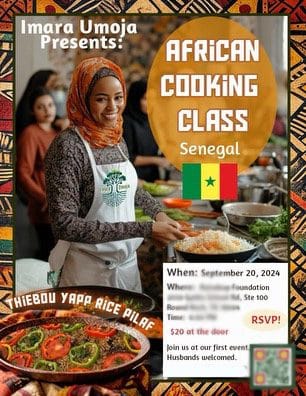
I needed a very specific image for a cooking class flyer for a new organization I co-created. The dish we’d focus on was from Senegal, so I needed an image of people in a kitchen enjoying themselves while the instructor demonstrated a traditional West African dish. The flyer also had to include the date, time, location, a QR code, and a main caption.
I wanted the piece to have an African vibe, so I requested a traditional African-inspired border, a beautiful platter, and cropped the finished dish to place in it. AI helped bring the elements together, but the final success came from my own curation and refinement.
I believe in creative collaboration with technology, but it’s important not to solely depend on it. We must take ownership of our creative ideas and processes. AI can be a tool, but the human touch is what gives the final work its meaning.
The Process: Me & The Machine
Here’s how I created the concept:
Narrowing down the name of the newsletter by eliminating uninspiring options.
Choosing fonts that fit the style and tone of the project.
Designing the logo style through iterations.
Software & AI used:
- MidJourney for images and ideation.
- Photoshop for brand identity.
- Illustrator to recreate the sunglasses.
- ChatGPT to brainstorm brand concepts.
The Redesign: Lessons Learned
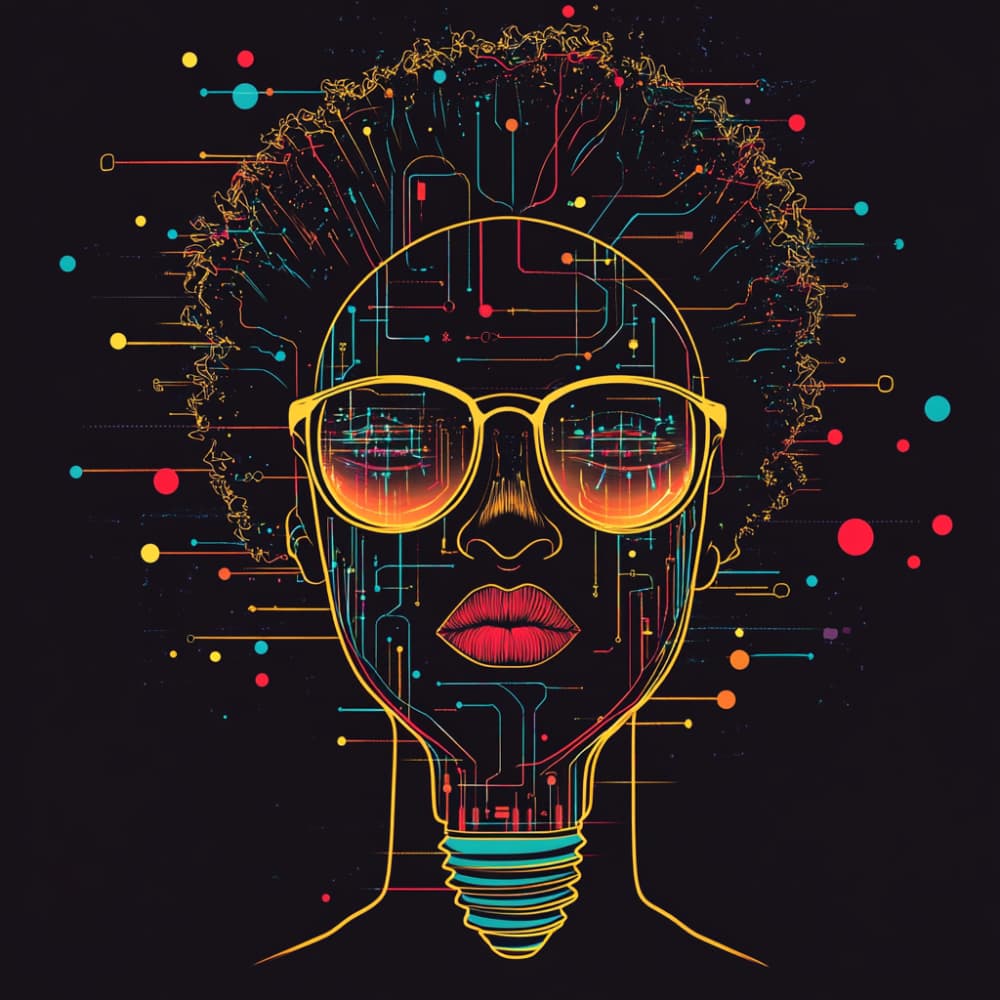
AI-generated art often has noise or artifacts—random elements that don’t belong, like someone having six fingers. The final resolution can sometimes be poor, and the artwork may feel too detailed or cluttered. I had to eliminate 95% of the original AI-generated design and start fresh. I traced the contour of the face and redesigned the lightbulb, sunglasses, and cyber hair to create a cleaner, modern, and futuristic look.
Symbolism in Design
The bold sunglasses in my design represented insightful thinking and vision. I had used similar glasses in a previous project for accessible design, but in that case, the glasses symbolized sensory sight. In this project, the sunglasses reflected personal insight and creativity.
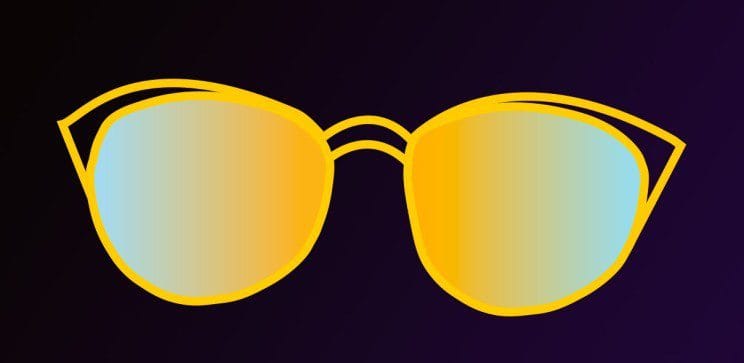
I especially wanted to create a reflective, mirrored effect using a gradient of two colors. Just like looking into a mirror, the design reflects the artist—not the machine. AI’s version was transparent, while I chose opacity because it carried more weight and symbolism.
The Face: Evolution of the Design
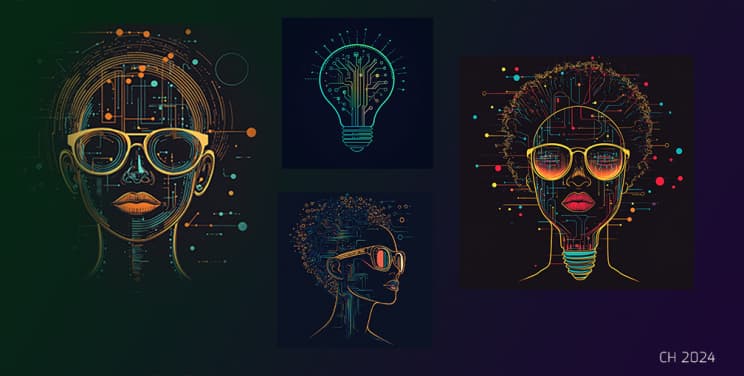
The Start: The face began as a lightbulb with a circuit board, symbolizing the fusion of machine and person. After many prompts, I narrowed it down to three options. I decided to remove the lines and keep the shape of the image intact, but redesign everything else from scratch.
The Final Design: The final design merges the machine and the human. The hair could represent entanglements, noise, or just colored hair. I borrowed the concept of circles and lines intersecting the hair from AI, but I redesigned everything else, except the lips, because of the noise and artifacts in the original AI version.
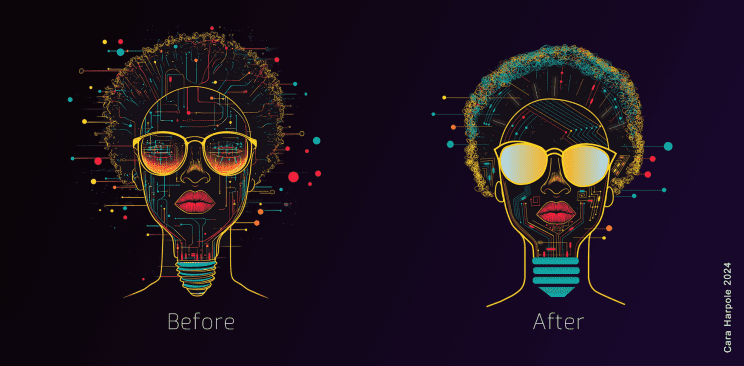
Noise: In this context, noise refers to random objects or unnecessary details in the AI-generated designs. For example, a person with six fingers instead of five. I eliminated most of this over-detailing while keeping elements like the colored dots, which I interpreted as representing an out-of-body experience, like traveling through space or time.
Removing the Lines: I wanted the lines to represent a path, not chaos. Some paths lead to a destination, while others don’t. That’s how the creative process works—some decisions lead us forward, while others leave us feeling lost. The lines, to me, represented the journey, while AI’s lines were more random.
The Takeaway
As society embraces AI, I hope we don’t lose our human insights and ownership of our work. AI is a powerful collaborative tool, but it should never erase the human voice. Taking bold creative risks makes our work unique and interesting. We don’t have to conform—we can break the mold while still aligning ourselves with good design principles.
Remember this: AI is a tool for enhancement, not replacement. The sunglasses representing insight were always part of my vision, and AI helped me visualize the concept. AI’s version was transparent, while mine was opaque. What do you think the symbolism behind that decision could be? I’d love to hear your views.
Exercise: Creating a Semi-Realistic Scene with AI Art Tools
Below is a step-by-step exercise designed to help newcomers create images using AI prompts. This exercise will guide you through selecting AI art tools, writing prompts, and refining your image creation process.
MY RESULTS – Using Midjourney
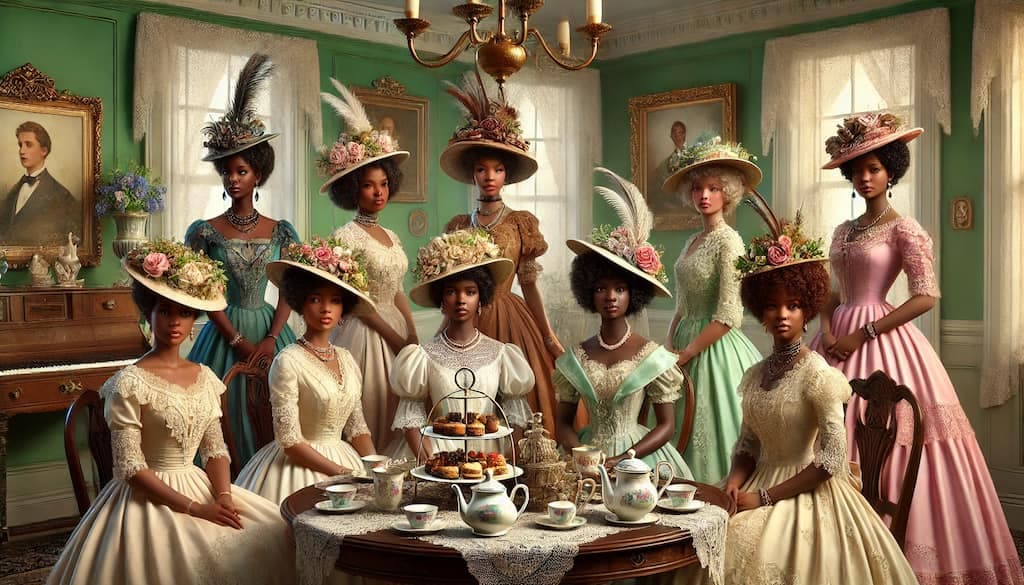
Create Your Own AI Generated Tea Party Image
Step 1: Tools You Need
To get started with AI art, you’ll need an AI image generation program. There are several options available, both free and premium. Here are some of the most popular ones:
- DALL·E (Premium with some free credits): Website: https://openai.com/dall-e This tool generates highly detailed images based on text prompts.
- Craiyon (formerly DALL·E mini) (Free): Website: https://www.craiyon.com/ A free, simplified version of DALL·E that generates quick AI art based on text descriptions.
- Stable Diffusion (Free and Open-Source): Website: https://stablediffusionweb.com/ A popular open-source AI model for generating art with flexibility in details and creativity.
- Dream by WOMBO (Free with in-app purchases): Website: https://www.wombo.art/ A creative AI art tool that lets you create visually striking images quickly.
- Artbreeder (Free with premium options): Website: https://www.artbreeder.com/ A tool that blends and morphs images based on user input, allowing for unique image creation.
- MidJourney (Paid, with trial options): Website: https://www.midjourney.com/ This tool is known for generating highly creative and artistic interpretations of prompts.
Step 2: Writing a Detailed Prompt
A well-crafted prompt is essential to get the best results. Start by thinking about the key elements you want in your image. Here’s a prompt breakdown for the sample scene you mentioned:
- Main Subject (Focus of the Image):
- Setting:
- Outfits and Accessories:
- Atmosphere:
- Additional Details:
Prompt Example:
Here’s how you can structure your prompt for the AI tool:
“Create a semi-realistic scene of African American ladies gathered at a formal tea party. They are wearing vintage Southern hats adorned with feathers and ribbons. The ladies are elegantly dressed in lace and pastel-colored dresses. The tea party takes place in an antique room with green walls, vintage wooden furniture, a delicate lace tablecloth, an antique tea set, and fresh flowers on the table. The atmosphere is warm and inviting, with the ladies engaged in lively conversation. Add soft lighting and subtle details like steam rising from tea cups and an antique clock chiming in the background.”
Step 3: Using the AI Tool
Now that you have your prompt, it’s time to use one of the AI art tools:
- Choose Your Tool:
- Enter the Prompt:
- Generate the Image:
- Refine the Prompt (Optional):
Step 4: Reflect and Experiment
- Once the image is generated, review it and think about what worked and what didn’t.
- Experiment with different prompts by changing small details (e.g., color of the walls, number of people, or decorations).
- Encourage your readers to try creating multiple variations of the same scene to see how different wording changes the result.
Conclusion
This exercise helps newcomers get hands-on experience with AI-generated art. By selecting a tool, writing a detailed prompt, and experimenting with different descriptions, your readers can easily create stunning and imaginative visuals.